Silicon Valley Technology Commentary & Archives · Est. 2006 3,045 Posts · 2006–2026
Showing posts with label SEO (5 posts). Show all posts

June 4, 2011

June 4, 2011 · 5 MIN READ · BY LOUIS GRAY

A Scorched Data Policy Is Bad for Web, Bad for History

A Scorched Data Policy Is Bad for Web, Bad for History

In a world where the cost of storage is practically zero, and the incentive to delete data declines, I'm befuddled by the lack of prioritization for some companies to focus on a complete search history, and in parallel, an intentional erasure of information by more prominent content producers, who seem to arbitrarily decide that the long tail of the Web, and the interest of future readers is less important than being seen as participating in the latest hip wave.

Even as I've changed technologies, blog providers and structures, I make extra effort to not lose historical archives and keep comment streams intact, not for ego purposes or for SEO, but because it's the right thing to do.

Steve Rubel, an executive vice president of global strategy for Edelman, a longtime blogger who was among the first to espouse the benefits of blogging, social media and was often at the leading edge of tech only a few years ago, has more recently swayed to and fro based on the hot startup of the day, leaving thousands of broken links in the process. After running out of time to update his blog regularly, back in 2009 he ditched the blog to run a lifestream, based on Posterous. (Google cache). Last month, he pivoted again (another hot thing to do in the Valley these days for those with unsuccessful ideas) and now is the proud owner of a Tumblr-powered blog.
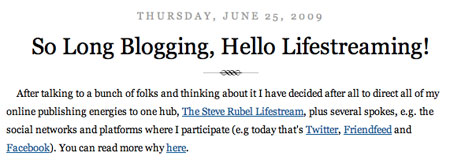
Pivot Number One Saw Steve Go to Posterous

Pivot Number Two Saw Steve Go to Tumblr, and Delete Everything

But instead of leaving the older sites open, he deleted everything, proudly stating:
"With just two clicks of a mouse I rid the web of literally thousands of blog posts, some of which I am proud of - others less so - and redirected the URLs to the new site."
While no doubt many of his older posts (like mine) have limited or no value to today's readers or those in the future, they are an insightful historical record of one of the more visible bloggers of a specific period, one who is now in the process of erasing his tracks.

With more than five years of blogging myself here, the blog archives now take on their own role as a personal reference desk. When Kevin Rose left Digg, I was able to go back to my comments on Digg in 2006 to see my thoughts at the time. When TweetDeck was sold to Twitter, I could go back to 2008 and see my first thoughts on the service. With PostRank selling to Google yesterday, I found a post I made two years ago that had comments on it from people who now work at Google. If I didn't manage to keep the posts alive and the comment threads as well, this would not be possible.
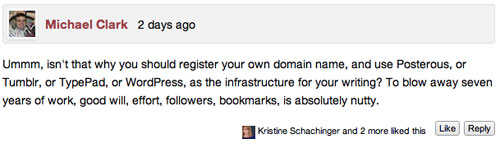
Steve's Community Is Very Unhappy With the Deletions, Calling it "Nutty"
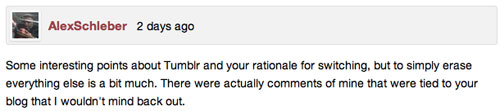
Others Say Erasing "A Bit Much", Want Their Comments Out

For those of you who don't consume my blog exclusively by RSS, you might have noticed some recent changes to the look and feel (Go ahead and look). It's not a major change, but an upgrade nonetheless. Part of the reason for my slow migration was the criticality for me to not lose the existing posts, structure, external links and attached discussions. I know some comments from a few years ago are still out of reach, but I'm hoping to bring them back.

Of all the Web content I have produced or managed in the last fifteen years, one of my biggest regrets is the complete void from my time in college, both from my own personal home page, and from the student newspaper where I was the online editor and also wrote hundreds of posts, most on the front page. Current Valleywag editor Ryan Tate, who picked up the online editor job at the paper after I had left, struggled with a series of malicious hacks, and all our collective work was gone, erased from the Web like a bad memory. Whenever we trade emails or talk in person, we both lament this loss.

Steve's Original Micro Persuasion Blog, Pre-Deletion

This data obliteration is something that really is avoidable now, and yet, we let it happen on a near-constant basis. Most newspaper stories from the terrorist attacks in 2001 come up as 404s, beyond the reaches of the Archive.org project, or Google's search engine cache.

What I would like to see is a proposal from Google, or some other well-intended Web entity, such as Amazon, to offer a solution, embedded in today's modern browsers, as an option, that solves for intentional or unintentional content deletion. All those links that I provided back to Steve Rubel's MicroPersuasion blog from 2006 to 2009 should automatically be detected as dead, and then presented, to the best of the tech's ability, as they originally were, using Google cache or S3, Archive.org or something. And yes, I'd love it if somebody like Google or Microsoft would also give Twitter or Facebook a helping hand to get their own search archives into something useful.

Steve Thinks The World Won't Care About His Old Posts.

The issues I have with Steve's approach to pouring gasoline on his past and then lighting it on fire is not one of a choice of platforms. While seeing him join Tumblr is about as hip as your dad trying to snowboard with the cool kids, the more important part is that it eliminates the choice for readers, present and future, to ever get that data, and fill in the blanks. It's not his call to decide what has value for others, even if he sent me a tweet saying "we're foolish if we think the world really cares."

The world should care about walking through the historical record - be it on Steve's blog, or Dave's blog, or Robert's blog, or Mike's blog, or Penelope's, or any of the people who have been chronicling the world they see around them. I wish we had full archives from newspapers for years and decades backward, or the personal journals of people famous and ordinary from centuries past. What they might have found mundane is intriguing to others of us - maybe not massive populations, but to one person, they could contain serious insight. The Web is supposed to cater to the long tail, and the history of what we've produced should be there when they come looking for it.

April 11, 2009

April 11, 2009 · 2 MIN READ · BY LOUIS GRAY

Are You Writing Your Headlines for Google or for Twitter?

Are You Writing Your Headlines for Google or for Twitter?

While RSS still plays a very important role for practically all online publications to get their news out to subscribers, and Google plays a critical role for the stories to get picked up by casual visitors, Twitter is playing a middleman role and growing in the minds of many publishers, who see the microblogging service as a significant traffic driver. Now, instead of using the catchy headlines we once saw in print, or keyword-laden headlines that make Google giddy, we're now seeing headlines truncated to less than 140 characters, or even as low as 125 characters as the standard, assuming a short URL follows.

For me, practically the only driver for the length of a headline is whether it easily fits in one deck for somebody using standard fonts in a browser. I don't tend to think about SEO benefits down the road and don't consider if the headline will "play well" on Twitter or other social networks, but do recognize that a good headline can be "make or break" for those seeing the story downstream, be it through RSS, or on aggregation sites, from FriendFeed to Techmeme or even Digg. (See my post from last year on this topic)

Given that practically every blog is publishing to Twitter in parallel with their RSS feed, the drive to keep headlines short is very real. In my short visit to TechCrunch headquarters on Friday, their tech team said they are very much making sure the headlines play well with Twitter. Their Twitter account now not only shows a headline and a bit.ly URL (for stat tracking) but also the author's Twitter handle, similar to how I've called out posts from other writers on this site with their own IDs.

As Twitter's impact on immediate traffic expands, it should be interesting to see how many blogs change their approach to headlines, and to see if they are in any way reducing longer-term traffic benefits from SEO for instant returns.

December 8, 2008

December 8, 2008 · 7 MIN READ · BY LOUIS GRAY

10 Pointers for Generating Traffic to Your Blog

10 Pointers for Generating Traffic to Your Blog

By Mike Fruchter of MichaelFruchter.com (Twitter/FriendFeed)


When it comes to just starting out with social media, there is no magic bullet for success. Nothing happens overnight, and if it does, it's usually short-lived. Like anything else is in life, it requires consistency, patience and perseverance. Last week, I expanded on the importance of how sharing and self promotion is always a two-way street. This post touches upon 10 general tips to help beginners generate inbound links and sustained long term traffic.

1) Ask for link exchanges:

It never hurts to ask first. This does not always work, but what do you have to lose? Most people are still courteous and do answer emails. Send an e-mail with a short personalized note asking for a link exchange. If you are just starting out, it's good practice to link to others first, wait a little while, and then ask for reciprocation. Look at the site first, if they do not have a blogroll or links to other blogs, then don't waste your time. If their not linking out to anyone else, then they probably wont link out to you, much less respond to your email.

2) Quality content is key:

You have heard this one a million times before, but there is a reason why. Your content defines you and the message you are trying to convey. Quality gets noticed above anything else. Create newsworthy, thoughtful, intelligent content that has immediate usefulness. Give people a reason to share and bookmark your site. Give people a reason to keep coming back for more. If your blog is informative, original or interesting, people will keep coming back. If your content is recycled or of poor quality, your fighting a downhill battle.

3) Separate personal from professional:

Maintaining a balance is very important. There is nothing wrong with straying off course every once in a while. If posts of a personal nature are imperative to you, and must be publicly published with some frequency, create a new blog for it. The occasional blog postings of baby pictures or a family outing is nice, they expose the human side of you, which everyone reading can in some way, shape or form, relate to. The same goes for bloggers who must auto-import bookmarks and tweets into their blogs, put it on a separate page, or minimize it to your sidebar.

4) Be a two-way blogger:
There are two types of bloggers. One way bloggers and two way bloggers. One way bloggers are basically just talking to their readers. While there is nothing wrong with that, the more experienced you get, the more you move up the food chain. By nature, this will lead to less interaction with readers. This is especially true when you are just starting out. It's crucial that you be a two way blogger. Two way bloggers engage with their readership, rather than one way bloggers who just talk to their readers. This means if people leave comments, take the time to respond. Go a step further, if the readers who leave comments have blogs, visit them, find a topic worthy post and leave a thoughtful comment in return. Encourage your readers to follow you on Twitter, or FriendFeed, and be sure to reciprocate the following. See what we are doing here? We are taking an interest in the reader.

5)
Encourage comments:

Interaction with your readers, by encouraging commenting, is very important if you are seeking sustained long term repeat traffic. Ask questions in your post. Ask the readers for additional tips or thoughts on the story subject. Do not require registration. Make commenting easy and not a chore. Shine the spotlight on your blog's top commentators. Most third party commenting applications such as Disqus offer sidebar widgets that will allow you to do this. There are Wordpress plugins available as well.

6) Empower your readers with the tools for promotion:

Let your readers promote your content by bookmarking and sharing your content. Add to your blog and postings promotional tools such as social sharing and bookmark services. I would recommend addthis.com, but there are plenty to choose from. Lets face it, people tend to be lazy, why not make it easier for them. Also make sure to clearly place RSS icons and text links on your blog. This makes it easy and also encourages people to subscribe to your blog.

7) Don't forget SEO, at least the basics:

By default if you are blogging, you are somewhat ahead of the game in terms of optimizing your content for search engines. But regardless of what type of site you run, paying attention to the basics of SEO will generate more organic long term search engine traffic. You must ensure that your page titles, headlines, url formatting, and content, all contain the blog topic relevant keywords or phrases. That's the tip of the iceberg. I wrote a more detailed post on 15 tips for improving search engine visibility, which is a good starting point.

8)
Establish and build power passports:

Just as you would need to establish your credentials in the form of a passport when flying to a foreign country, the same is true with the territories we embark on in social media. Passports are the social profiles that we create on other social networking sites and platforms. Other than a blog for the most part, these are our online credentials. Your Facebook, LinkedIn, Twitter and Google profile are all passports. More importantly, they are all sources that generate search engine traffic. The sites mentioned above are all authoritative. As a result, links established on those services rank higher in the search results. Consistency is the name of the game. All of your online profiles should share the same information. Make sure to use the same usernames. If possible, use the same profile pictures, logos, and contact info. Always link back to your blog, and your other passports. Maintain a recognizable, uniform presence across all social networks, professional and personal.

9) Develop relationships with other bloggers:

Successful social media marketing/branding/self promotion or whatever you would like to call it, is always a two way street, never a one way. It's actually about giving more then you get. When first starting out, it's vital that you develop friends, a following and a network. This will take weeks to months, and that's okay. As with life, offline relationships take time to form, grow and blossom, the same is true for online. Just because you decided to follow me on Twitter, or FriendFeed, does not mean we are instant friends. You have taken the first step, which is good because it shows that you have expressed interest in me or my content. The next step is staying on the blogger's radar. Most likely some of the bloggers you decided to follow will already have an established and large active following. With that being said, sometimes you might need to stand out from the crowd to get noticed. The easiest way of doing this is by participating in the blogger's circle. Leave thoughtful comments on their posts, retweet their content, and share their content. Fill the vacant slots on your blogrolls with links to their blogs. Lastly, show them some real linklove. Write a blog post and positively link to them. Your network can make you or break you in some respect. Associate with the wrong people, and risk damaging your brand, and wasting your time in the process. Associate with like minded thinkers and doers, and propel yourself forward, it's really that simple, I promise you. The name of the game is time. If you are willing to contribute and spare a lot of it, it will payoff in the end. These means do justify their ends.

10) Use your treasure chest wisely:

Learning about where your visitors come from and how they interact with your site is just as important as anything else. It starts with a good analytics package. The treasure, your traffic data, lies inside. Two points I will touch upon with this is the ability to track search engine traffic by keyword, and the ability to find anyone and everyone who has a link to your site. Establish relationships/linkbacks with the sites linking to you. You can also gauge, track and readjust any SEO marketing efforts. The driving point here is you need direct access to url referral tracking. Use widgets such as MyBlogLog to help build community on your site. However, it also serves another purpose, which is that it tracks and reports incoming urls to your site (how people got there) and what they clicked and viewed on your site. Be as informed about your traffic as you possibly can. Never be too afraid to step out of your comfort zone and experiment with new technologies.

Image by laffy4k under Creative Commons license.

Read more by Mike Fruchter at MichaelFruchter.com.

November 17, 2008

November 17, 2008 · 7 MIN READ · BY LOUIS GRAY

15 Tips on Improving Search Engine Visibility

15 Tips on Improving Search Engine Visibility

By Mike Fruchter of MichaelFruchter.com (Twitter/FriendFeed)

I will first start by stating I am not an SEO expert.

Over the years, I have studied and tested various methods, guidelines and techniques for generating search engine traffic. Back in 1997, I took on paid clients and SEO became a full time career for a few years. AltaVista was the dominant leader in search in those days. Learning how to control and manipulate the engines to get front page search results became my main objective and an obsession. Today, things are a lot different, as there is basically one dominant leader in search, and the playing field is more level than it's ever been.

Most of these practices and techniques are still very much relevant today as they were then, so I thought I would touch upon a few of the key ones.

1) Start with your domain name.

You have heard it before a million times, register a .com domain name. The domain spelling should be as equivalent to someone typing that word in a search engine. It should be relatively short and easy to spell as well. Try to avoid hyphens and or any unnecessary or unusual character variations. Most search engines still to this day give a lot more weight to .com extensions, as opposed to other TLDs. Keeping the domain name easy to spell and avoiding hyphens is more for branding purposes, than SEO. Search visibility can still be achieved with a confusing, long character riddled domain that makes no sense at all, but will someone be able to find it, and most importantly remember it without the assistance of a search engine?

2) Establish quality inbound and outbound links.

Search engines, more specifically Google, ranks your site based on the amount of inbound links it has from other sites. Spend time and get authoritative sites linking back to you. Inbound links from these sites are worth their weight in gold. Links from an authoritative site also influence ranking. More weight is given to these inbound links because these sites are considered a trusted and or leading source as they are considered the most influential on a particular subject matter, e.g. Wikipedia.org

3) Understand PageRank.

Websites that Google believes are important and influential receive higher PageRank. A Higher PageRank can influence better search results and rankings. Authoritative sites, for example, usually have a high PageRank. PageRank is worth taking note of, but should not be your main focal point. You can check a site's PageRank by going here, or by installing the Google Toolbar.

4) Put relevant keywords on all of your Web addresses.

Make sure any content you publish on the web has the keywords of the subject or story headline formatted in the permalink/web URL. If your are writing a post, for example, about how FriendFeed was just acquired by Google, you would format the URL similar to this, http://www.yoursite.com/friendfeed/google-acquires-friendfeed.html, or http://www.yoursite.com/google-acquires-friendfeed.html. Notice the sub-directory in bold has the keyword of the story subject. Take advantage of whatever you can to give as much URL mention of the target keyword as possible.

5) Headlines and page titles should always contain the target keywords.

In combination with having the relevant keywords in your URL, the same emphasis, if not more, needs to be placed on placement of keywords in your headlines and page titles. If you do no optimization at all, at the very least always practice these three guidelines. It's also a good idea to put the relevant keywords of focus first in the headline and page title, and if possible somewhere in the start of your story content. Failure to practice these guidelines will leave your site buried pages deep in the search results, rendering it almost nonexistent, at least to the search engines.

6) Start a Blog.

Blogs are a major source and very relevant source of information for millions of people daily. Blogs are also influencing consumer's decisions to buy products. Think about the last time you searched for something on Google. There is a high probability that you found your information on, or were referred from a blog. Search engines, specifically Google love blogs for the rapid amount of fresh and timely content they produce. Setting up a blog is very easy, and if tweaked correctly can be a powerful tool for search engine traffic generation. Configure your permalink structure immediately after installing your blog. Spend five minutes tweaking the basic admin settings. I would also recommend installing and using plugins such as the "All in One SEO Pack" available for WordPress. Now you can focus on producing the quality content that will get your site linked to and noticed. Give and get as much "link love" as possible. Become an expert in your field and let your content reflect that. Use the power of RSS to convert that search engine click into a return visitor.

7) Use keywords as anchor text when linking.

Anchor text is weighted highly in search engine algorithms and subsequent search results. Anchor text gives the user and search engines descriptive information about the content of a hyperlinks destination. Use Anchor text keywords, especially as often as possible when linking to pages. Avoid using "click here" at all costs, this will do nothing to increase or improve visibility.

8) Install Web Analytics software.

Flying blind is foolish. You need to first measure, and understand your traffic patterns and behaviors before you can seek to improve it. Installing Google Analytics should be your starting point.

9) Utilize Sitemaps.

Sitemaps, are basically a list of all the pages pertaining to a particular site. This protocol allows you to notify Google about URLs on your website that are available for crawling and indexing, that may otherwise have not been discoverable by Google's normal crawling process. They also should help with getting your site crawled in a more timely fashion.

10) Use Google Webmaster Tools.

Google's Webmaster Tools, allows you to see your website the way Googlebot sees it. The tools provide data on finding out which sites link to yours, finding search queries that list your site as a result and finding which of your site's pages are indexed, and also showing you any errors Google encountered while crawling your site. Those are the core features, but there is more under the hood. The goal is to make your site as Google friendly as possible. The more data you are armed with and utilize, the better your chances are for higher visibility in search results.

11) Produce and publish quality content with some frequency.

Write quality content and publish on a regular basis. Sites that publish more frequently are seen as more reliable than sites that seldom do. This also helps for you to increase the amount of content on your site, which in turn yields more indexed pages, which then yields more visibility, increasing the quantity of search clicks to your pages.

12) Use Headline tags.

Headline tags (h1, h2, etc.) are a great place to use your targeted keywords, phrases and secondary keywords. Search engines recognize that headline tags are more important than the surrounding text, therefore they assign greater value to keywords found within them.

13) Don't forget about the other engines.

Google, the gorilla, produces the biggest quantity of search traffic for the majority, but don't forget about Yahoo & MSN. It's at least worth the effort to stay current on both of their publishing guidelines. Yahoo has a resource for web publishers, as does Microsoft to help you better optimize your pages for their engines.

14) Consistency is the name of the game.

Focus on what works and run with it. There is not one single magic bullet for achieving better search results. It's a combination of these practices and understanding what criteria the search engines look for when indexing your pages. Search is all about optimizing for the relevant keywords or phrase, master this practice and it will pay off. Don't expect results instantly. It takes time to build up your content, establish inbound links, tweak and re-tweak.

15) It gets better by using social media.

Guess what? If you are active in social media, you are probably already ahead of the game. Social networking profiles such as Facebook, LinkedIn, and Twitter all get favorably indexed, and always rank on the top of the search results. This is especially great if your goal is for personal branding. Being active and maintaining consistency, should easily allow you to own your name in Google. Social media is probably the most invaluable tool you could use for traffic generation, if executed correctly. User generated content and the applications that power them such as, blogs, wikis,video, social networking sites, bookmarking, microblogging, etc are the leading mechanisms for search engine traffic, and will only increase as time goes on.

Image courtesy of Silent under Creative Commons license.

Read more by Mike Fruchter at MichaelFruchter.com.

July 13, 2008

July 13, 2008 · 2 MIN READ · BY LOUIS GRAY

Walking the SEO Balance Beam

Walking the SEO Balance Beam

Guest Post By Cyndy Aleo-Carreira (E-mail / Twitter)

There's a battle brewing, and it's between SEO advocates and content creators who prefer a more organic growth to their sites. On the one side are the SEO abusers who litter poorly written content with an oversaturation of keywords, making content unreadable, and on the other are those who pay no attention to keywords, don't realize that you can add the Page Rank indicator to the Google Toolbar to check the rank of an individual page, and write whatever they want, with no thought to subject focus or search results at all.

There is, however, a fine balance that can be struck between the two sides, and that balance can be achieved with a focus on the reader rather than on the stats. If I had my way, I'd write whatever I wanted with no thought to the dreaded search engines, but if I did that, I probably wouldn't get paid for my work, so I try to keep a constant eye on that balance.

Much like advertising, overuse of SEO techniques is becoming an annoyance to readers, and if someone were to develop a plug-in like AdBlock Plus that could filter out content that was oversaturated with keywords and internal links, people would download it by the thousands, if not millions.

Still not sure what I'm talking about? Let's take a look at this Mahalo page for a spoof video. You'll notice that in a 68-word Guide Note, there are 13 internal links to other Mahalo pages. Some links are split across lines, making it look like even more. While it may look good to a search engine spider, it looks unreadable to the casual visitor. How many users will actually click those links to find more information? How many will instead click out of the page and move onto something more user-friendly?

Walking the balance beam when it comes to SEO involves a common sense approach: keeping the keyword in the URL, title, and text, but not beating the reader over the head with it just to make it more obvious to the search engine spiders. And sure, offer an internal link for something that the reader may want to see for additional information, but don't link to every single possible page on your site in an attempt to plump up your page rank and search engine appearance. Your readers will thank you, and hopefully, send others.