Silicon Valley Technology Commentary & Archives · Est. 2006 3,045 Posts · 2006–2026
Showing posts with label Google Apps (4 posts). Show all posts

March 29, 2010

March 29, 2010 · 3 MIN READ · BY LOUIS GRAY

LedeLog: Google Apps Hosted Media Workflow, Launches

LedeLog: Google Apps Hosted Media Workflow, Launches


In what Google's Brett Slatkin termed a "small foray into productivity software", the developer best known for his work on the PubSubHubbub protocol released a note-taking application for journalists and researchers, featuring rich text, tagging and built-in privacy controls that keep notes available only to the creator. The product, titled LedeLog, runs on Google's cloud infrastructure, and auto-saves progress every ten seconds, so vital notes don't get lost. As simple as it sounds, it is robust enough to serve not just for its intended audience, but it looks like the beginning of new word processing or blog authoring tools. In fact, just for testing purposes, I authored this post on LedeLog.

The product's name derives from journalist's use of the term "Lede", which refers to the lead paragraph in any story, and says it is built for the workflow of modern journalists - but could work for anyone who wants to take down notes and save drafts with tags that are searchable.

This Post, Being Authored In LedeLog

When I am interviewing somebody for a story, or dictating notes in a meeting or event, I tend to simply open Apple Mail and tap out my data there - a byproduct of my getting used to older blog platforms from yesteryear that lost my data if the Web browser froze (although Blogger autosaves now). This results in an undesirable list of untitled drafts in my draft messages folder, sorted only by date - certainly without any tags. Going back a full decade to my time at the Daily Californian at UC Berkeley when I was a reporter in college, I similar wrote out my notes in Nisus Writer, an archaic word processing system for the Mac. It's highly likely that many journalists today, provided they aren't using a pen and paper, are typing out their notes in Microsoft Word - so you can forget about tagging or searching those documents. LedeLog, though new and raw, could be an interesting alternative.

For any journalist who wants to keep their sources secure and their notes safe, LedeLog is a step above saving any of that content on a local disk. LedeLog "ledes" are saved in the Google cloud (I assume powered by AppEngine, where Brett spends most of his time), and are accessible only through one's Google Account or OpenID.

Searching LedeLog by Tag and Discovering This Post

Unlike many startup projects, which release in beta with no users, it sounds like LedeLog has already proven itself in the field. Its description in the Google Apps Marketplace says "LedeLog has been in constant use by professional journalists since January 2009." The Marketplace description also says the product is free for the next three months and may have further pricing information after that point. Including the product in the Google Apps Marketplace, in the document management category, enables companies who have set up Google Apps for their domain to deploy LedeLog for their users.

The media hasn't been given too many helping hands of late, and LedeLog isn't designed to make unprofitable businesses profitable again. But it is a very handy tool for note-taking, search and security. It's another peek into a world without Microsoft Office, where documents can be created in the cloud and shared outward. Every LedeLog can be e-mailed to an external address, such as an editor. Brett's initial notes on the product suggest in can handle the management of hundreds of Ledes easily. You can give it a shot at LedeLog.com.

March 9, 2010

March 9, 2010 · 1 MIN READ · BY LOUIS GRAY

Google Buzz Integrating With Apps Still Pending

Google Buzz Integrating With Apps Still Pending

Editor's Note: This version replaces a prior one that suggested rollout had already started.

When Google Buzz debuted a month ago, integrating a new social network into your GMail, it did not roll out to business accounts running GMail on Google Apps. At the time, the company promised Apps customers would see Buzz added "within a few months." A premature promotion of the mobile version of Buzz to both consumer GMail users and Apps users made some see Buzz erroneously, before its time.

On Tuesday, as Susan Beebe's showed, many Apps users saw Buzz appear as "New" in their GMail settings, with a description of the new service. But that excitement proved to be short-lived, as explained by Todd Jackson, GMail Project Manager at Google, late Tuesday night.
"Nope, we haven't released Buzz to Apps customers yet. We had a small issue this afternoon where we mistakenly promoted the mobile version of Buzz to both consumer Gmail users and Apps users, but this is now fixed," he said.
When Buzz actually does go live for Apps, the social sharing service, which took some initial criticism for aggressive connecting and transparency, taking a step into the corporate world, will need to do so tentatively, as discovery of partnerships, let alone recruiters or other relationships, is more dicey than familial or casual friend connections that dominate most GMail activity.

Buzz Rolling Out to Google Apps?

Susan showed screenshots of Buzz appearing in the mobile version of Susan's GMail account, where Buzz is marked as "New", and features a short description of the service, as letting you "see what's going on nearby and post messages for your friends tagged with your location."

Susan Shows Google Buzz In Her Apps-Enabled GMail.

Whether you use Apps or not, you can find me on Buzz here. TheNextWeb also reported similar early deployment, which has since been explained.

May 22, 2009

May 22, 2009 · 4 MIN READ · BY LOUIS GRAY

Personal Heresy: What OS You Use Is No Longer Critical

Personal Heresy: What OS You Use Is No Longer Critical


Last September, when Google's Chrome Web browser was first introduced, I told you how I spent the day on Windows, just to use it. While Google is making headway in bringing their Web browser to the Mac platform, or so I've been told, it just hasn't happened yet. In the interim, Apple introduced Safari 4 Beta with many of Chrome's much-awaited features, and Safari has remained my browser of choice, as I tend to find Firefox too slow and too bloated, especially as extensions are added.

Today, I came across an article by Rick Klau, who works at Blogger for Google, saying how he was using Chrome on his Mac, also through VMware, but most importantly to me, as a result of Microsoft's new Windows 7 evaluation program, which lets you gain access to the operating system for free for a year. With my nose in the air, I've watched from my Mac laptop the struggle Microsoft has had with Vista, and how users are begging for Windows 7 to arrive. I've seen Steven Hodson and others talk excitedly about what's planned from Redmond, and largely, I haven't cared. I didn't think it applied to me.

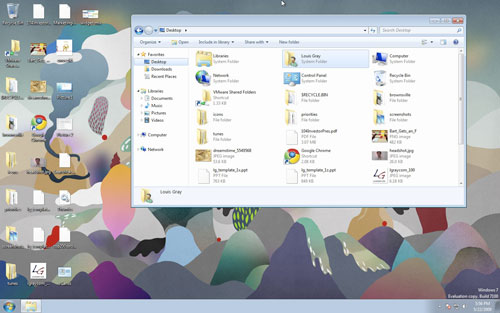
But think of what Rick told us. Any Mac OS X user who has VMware Fusion (or Parallels, I assume), can get access to Windows 7 today, just by downloading the 32-bit version of the .ISO file from Microsoft and getting started. No CDs. No hassles. Just an evaluation key, and letting VMware do the work. The geek in me overruled my Mac bigotry today, so guess what? I'm writing this post in Chrome on Windows 7 in VMware on Mac OS X. It just works.


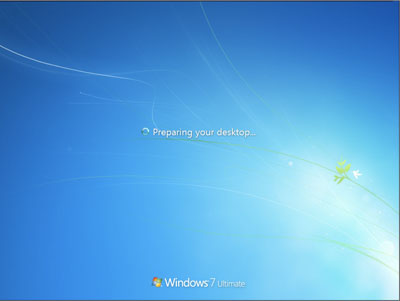
What? Windows 7 installing on my Mac?


Windows 7? Mac OS X? Does It Matter Any More?


So - back to the focus of the post. For the better part of two decades, I have ranted and raved that Macs are superior, whether it be for the hardware or the OS. The Mac vs. PC commercials on TV are very amusing and help cement the belief I've got a better product. I can largely ignore malware, and know I can get a consistent experience from Mac to Mac for the most part.


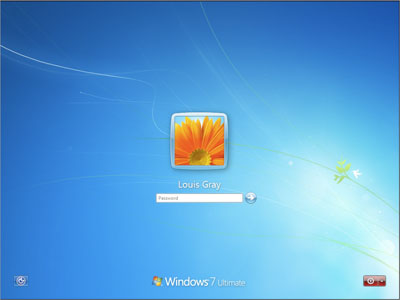
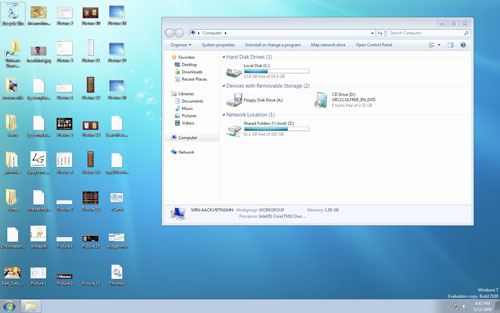
Logged Into Windows 7 And Checking the Computer


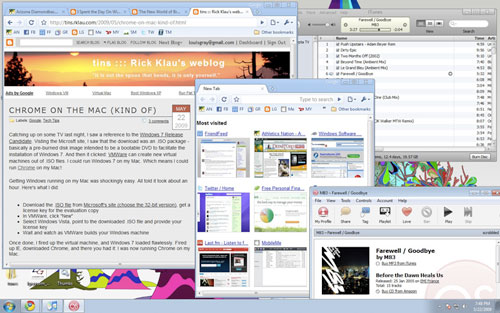
Sharing My Desktop Between Both Mac and Windows


But I'm starting to think more and more that it really doesn't matter any more. I won't be ranting about the cloud and saying all software is dead, but within an hour, I've got my Web browser set up to all the bookmarks and social services I constantly use. I have iTunes in VMware on Windows 7 seeing all my music from the Mac. I have an FTP client I can use to post to the blog. Practically all I really need the Mac for is the Adobe Photoshop family, Microsoft Office and the comfort of knowing my e-mail is saved locally as well as through MobileMe.


A Typical, Active Web Session, But On Chrome and Windows 7
(Click for a larger image)

I don't feel I need to go feature by feature of Windows 7 and see if it has all the bells and whistles that Mac OS X does. Maybe it does. Maybe it doesn't. But with very few exceptions, I could switch to Windows in this environment, and not lose too much sleep - something that would be made even more possible were I to push all my mail to GMail and take my word processing to Google Docs, for example.

Also in September of 2008, I speculated that the new world of browser choices is all about the hooks, especially from each company's mobile platform. The iPhone loves Safari, as you know. But Safari is also available on Windows, and the iPhone can be synced on iTunes on my Windows 7 partition. Hmm.

The line between what is an Operating System, and what is a Web browser, is getting increasingly blurry. And the traditional benefits of the Mac that always had me red in the face and starving of oxygen when trying to convert non-believers are going away. Maybe that's why I stopped caring about Apple rumors, as I told you last week.

If I do run into somebody willing to listen about what operating system they should choose, I can without hesitation say the Mac, because it's still what I know best, and I have had such a good track record with Apple. But Windows 7, so far, is good enough for most people, provided they can avoid bugs, malware and other irregularities.

So you tell me, am I out of my mind, or finally seeing the light?

January 23, 2009

January 23, 2009 · 3 MIN READ · BY LOUIS GRAY

The Danger of Changing The Baseline

The Danger of Changing The Baseline

By Rob Diana of Regular Geek (Twitter/FriendFeed)


There has been a lot of discussion regarding the recent announcement about Twitter's API limiting. The SocialToo blog has a very good overview of the situation. Granted I am not a fan of the limitations, but that is not the reason for this post. Changing the limits is the real problem.

The baseline for any application is when it is released. Any updates or new features added to an application reset the baseline to a higher level. The user and developer community are your best friends during this cycle. It can be argued that Twitter would not be nearly as popular if there was no API or third party applications for it. However, if you decide to change something in an application, and the net effect is a decrease in functionality, it feels like you have taken something away. For example, Jesse Stay, the founder of SocialToo, realizes that these limits now change the way applications can use the API:
Many of the services you have come to love for Twitter, including those of our competitors, and many other Twitter-based services are in jeopardy. This is scary news as an entrepreneur and Twitter developer. Twitter has basically just limited how big any Twitter-based business can grow.
Changing The Baseline

The real problem is that these limits appeared long after the API was released. Twitter has consistently removed functionality during peak traffic periods as well. Things like deleting direct messages or viewing older messages often gets disabled. This does not provide a good user experience.

Twitter is not the only one doing this either. Google has also recently done this for their Google Apps product.
When Google Apps first launched up to 200 user accounts could be created for each business under the free version. But that limit was quietly reduced to just 100 user accounts. And then when the reseller program was announced earlier this month, the limit was cut in half again, to just 50 accounts.
Obviously, this is bad for the users and good for Google. However, lowering this limit is devaluing the service that Google is supplying. Sometimes a company will have a promotion when first launched where the account limit is temporarily raised, but it is also known that it is temporary. In Google's case, the Apps offering has been around as long as Twitter has. So, it is not the case of a quick change, it has been changing over the course of years.

The Danger

The real danger appears after the changes take effect. If the changes or limits are drastic enough, the popularity of the application could decrease rapidly. In some instances, your users could rebel or even start building an alternative product. The idea is that the application must always move forward. In some cases, moving forward may mean a small step back, like a little used feature that is poorly implemented gets removed until a rebuild of the feature is ready.

For startups, losing popularity or even a small decrease in users or hype could mean the end of the line. In the case of Google Apps, lowering the number of free users may actually drive small companies away from them. Many small companies may be using Google Apps because it is free, and they can grow with the service. Now, with a limit of 50 free users, companies need to make decisions on Google Apps or other online application suites shortly after hiring employees.

In reality, you want to push change for the better. You want to keep your customers as happy as possible. Enforcing new limits long after releasing features can just alienate your users. Some level of trust will be lost because it feels like they were tricked by your earlier kindness.

Read more by Rob Diana at RegularGeek.com.