Silicon Valley Technology Commentary & Archives · Est. 2006 3,045 Posts · 2006–2026
Showing posts with label Cadmus (8 posts). Show all posts

May 18, 2011

May 18, 2011 · 7 MIN READ · BY LOUIS GRAY

Why The Filter Bubble Is No Bubble and It's Not Bad Either

Why The Filter Bubble Is No Bubble and It's Not Bad Either

Multiple Factors Go Into A Solid Personalization Service
(from my6sense's internal slide decks)

Eli Pariser, former Executive Director of MoveOn.org, is a smart guy who knows the Web very well. His most recent work takes on the movement toward services that adopt algorithm-driven personalization to provide you individualized content - which he calls "The Filter Bubble", matching a book he recently wrote by the same name. His summary, as eloquently stated during a TED talk in March, is that we as Web consumers are going to miss being exposed to information that challenges our views, that we will self-select our sources and content we wish to consume, and the services will comply. The result? A dangerous world, he argues, that is bad for democracy, and no doubt bad for knowledge as well.

Spending considerable amount of time thinking about the impact of machine-driven personalization as VP of Marketing at my6sense, as well as being an early adopter of many other tools that adopt various factors of personalization, from The Cadmus to Zite, Flipboard, Hunch, Cascaad and others, it is important to think about the impact of our efforts to bring personal relevance to the fast-moving Web and if we are indeed pushing people instead to a house of mirrors where most things look the same and the comfortable world agrees with our world view.

First, the argument that people prefer to associate with like-minded individuals and listen, read and watch news and commentary that agrees with their worldview is pretty well accepted. In politics, conservatives may prefer Fox News for their media, while liberals prefer CNN and MSNBC. This is exacerbated dramatically further on the Web with niche discussions becoming even easier to find. Way back in February 2006, when this blog was pretty new, I talked about how people don't usually want to mingle with people of opposing views, but instead that views become polarized as communities flock to the edge, where they are comfortable.

Quoting my 28 year-old self:
"To measure credibility on the Web, visitors are looking for people who already agree with their opinions. They're not so much looking to be changed or to gain information from other viewpoints, but to instead become more hardened in their positions."
(See: Blogging Bifurcation - A Web Divided from February 23, 2006)
No matter the media, be it online or offline, we self-select what we consume based on a vast number of criteria.

We first self-select the source of our content - for example (in a world of dead tree papers) the New York Times, instead of the Washington Post or USA Today. Then, we choose how we are going to consume the content, be it to skim the front page first, or to dive into the business section. Perhaps we always read Sports first and then go back to the front page, and finally settle on the Features section. What we don't do is read every single story from beginning to end starting at the top left and moving to the back. Similarly, on television, we have our favorite shows, and again, we have preferences. We don't tun the TV on to channel one and hit the "up" button on our remote control until we find something we like. Instead, we choose our watching behavior based on our interests, and in a world of DVRs, we watch our favorite shows and limit our options to even be exposed to commercials highlighting other fare on the same network.

Personalization Puts You At the Center of Content

What new tools like my6sense and others are doing is recognizing that this capability of accurately divining the order of your preferences is largely missing in a new world of real-time streams. No man, not even the cyborg tech bloggers among us, can read every single tweet, Facebook update, Techmeme headline or news story that crests The Drudge Report. What my6sense and others like it are trying to do is eliminate the noise which you will never be interested in, while at the same time, surfacing the content which is deemed important to you based on your interests. No two people consume content in the same way, so presenting the content in the same way to each person (as has been done for centuries) doesn't make too much sense any more. It makes more sense, both for the user and for the content producer, to bring the best and most relevant content to the right people who want to see it and engage with it.

The concerns raised by Pariser are absolutely valid if the services being personalized don't offer any way for content that has not previously shown interest to come into your sphere. If the only signals that you've given to a service are that you like Apple computers and NBA playoff scores, and that's all you'll get, you'll have a poor understanding of the 2012 presidential election race and probably might not have noticed the fluctuations in the price of gas.

In my6sense, there are two critical ways that make sure you don't stay in your bubble forever:

1) There is always the option to view your streams sorted "by Time". Always.

Every single application that we have provided, from our iPhone and Android applications, to the NOOKColor application with Barnes and Noble, and even the Twitter extension on Chrome, offers a "relevance" tab based on your interests right next to the traditional chronologically-ordered view. There's no winner take all algorithm that erases the time view, because we know you should always have the option to see what your connections and feeds are saying "right now".

What's being discussed in the "Time" column could be anything. It could directly fall into your interests, or it could be something completely random, and that never will go away.

2) Collaborative filtering, while not the dominant signal, is still a signal.

If I have trained my application to know that I have a strong liking for technology news and consume this most of the day, it's unlikely that I will have previously given information that signals any interest in Osama Bin Laden's death or the earthquake in Japan. That said, if an event occurs that gets the attention of many of my social connections who begin to discuss it or share items on that topic, the system should interpret that as a strong social signal and surface this content in the application, so that alongside my regular Android ecosystem updates, I retain the option for breaking news.

In November, I wrote that "The Third Wave of the Web Will Be Uniquely Personal", as services adapt to my preferences and history to bring me a unique experience. We see this happening with Gmail's Priority Inbox, Google News personalization, the Facebook news feed and many other tweaks to our Web consumption experience. This doesn't mean that we are going to opt ourselves into a bubble by which we are never exposed to opposing viewpoints. Instead, it dramatically hones our signal to find us the best of what we want to see and leaves the door open for the real world to impact us.

As a member of the management team on a service that offers aggregation and multiple sources of a content, we often talk about how it's not a great user experience to deliver many articles in a row from a single source, or many articles in a row talking about the same event, even if it happens to be the event that is most critical for you to know. It is also not a great user experience if you feel that you are isolated, in a place where no other ideas enter and no other viewpoints get a chance to cross your screen.

The trend of personalization is a great thing - not bad at all. Every day you are self-selecting your news based on who you follow on Twitter and Facebook. Every day you are self-selecting your news based on the RSS feeds you read and the social networks you visit. This is something you are already doing. What apps like my6sense and others help to do is get you the best of what you want and free up the time you'd usually spend looking for that great stuff to go off and do something else - maybe start your own product... or even read other viewpoints where arguments are welcome.

For more on Eli's thoughts, see his interview with Time.com here: 5 Questions with Eli Pariser, Author of 'The Filter Bubble'. He is on Twitter at @elipariser, where he has personalized his news feed with 460 hand-picked people to follow.

Disclosures: I am vice president of marketing at my6sense, who delivers personalization of streams. my6sense can be assumed to be competing with multiple services in this piece, including Cadmus, Flipboard, Zite, etc.

September 9, 2010

September 9, 2010 · 2 MIN READ · BY LOUIS GRAY

Cadmus Introduces API for Tweet Relevance

Cadmus Introduces API for Tweet Relevance


There's no question the market for determining personal relevance is a hot one. In addition to my6sense, which you've no doubt heard a lot about from me on this week and last, one of the more interesting players in this space is The Cadmus. After debuting in November of last year as a real-time stream filter to eliminate duplicates, the company found a solid position determining personalized aspects of Twitter, including trending topics, which launched in February, and trends by list the following month. Now, the company is branching out with an API that lets other Twitter clients tap into Cadmus for personal relevance.
   
The Cadmus At Work in TweetAgora, Tapping Their New API


If this sounds a lot like what my6sense is doing - that's because it is! my6sense introduced an attention API earlier this March at the DEMO conference, letting partners order all streams, from RSS to Twitter and Facebook, by relevance. With information overload being a serious problem for most active social networkers, and few content sources and clients doing much more than offering streams ordered by chronology, there is clearly a gap to be filled.

Cadmus is also teaming up with a lesser-known Twitter client called TweetAgora to raise the visibility of the good stuff while hiding the rest. TweetAgora highlights the opportunity as "Find the goods." and "Filter the junk.", including muting tweets by keyword, muting individuals, conversations, and blocking specific services, including Foursquare, Gowalla and Formspring.

Muting individuals has been closely associated with Twitter client Brizzly, from ThingLabs, and SocialToo, Jesse Stay's company, who I advise, also offers the option to mute or unfollow people by keyword, and to unfollow people based on the service used to update Twitter.

Cadmus' ability to launch an API with an active partner is a solid start, and the company is actively seeking out partners. You just might hear about some of their news tonight during an event with Seesmic.

To download TweetAgora, featuring Cadmus, head to the iTunes store here.

Disclosures: I am vice president of Marketing at my6sense, an assumed competitor of The Cadmus. I am also an unpaid advisor to SocialToo.

August 3, 2010

August 3, 2010 · 2 MIN READ · BY LOUIS GRAY

KeyTweet Finds Most Relevant Links for You From Twitter

KeyTweet Finds Most Relevant Links for You From Twitter

Unless you've mastered the art of not blinking, you probably miss updates from connections on Twitter. Even the most attentive of people will have gaps in their attention to the real time stream. As Twitter has become a prominent place to share links and point followers to news and sites of interest, new services have arisen to find the best of what you may have missed. Among the newest, in early beta, is a site called KeyTweet, which finds relevant tweets that contain links, based on keywords in the streams of those you follow.

KeyTweet, like Cadmus and My6sense's offerings before it, aims to find a relevancy filter for Twitter, to surface important updates and hide the more trivial. But instead of using implicit activity, as my6sense does, or collapsing duplicates and finding conversations as The Cadmus does, KeyTweet finds popular topics that people you follow tweeted about, and brings tweets that match multiple keywords to the top of your stream, sorted by relevance.

Top Topics from My Followers Today in KeyTweet

For example, in my stream this evening, I saw many updates on Foursquare, Posterous and Android, as well as the highlight of the day - the arrival of Sean and Laurie Percival's new baby. As many people, myself included, highlighted the infant's debut, Percival effectively became a "trending topic" among those I follow.

Many people have begged Twitter for trending topics among your friends, and they have seemingly instead opted for geographically chunked data. KeyTweet, like The Cadmus and Twazzup Reader, fills that gap, analyzing your stream live. As new matches to top keywords flow into your stream, they too get a chance to sit atop your feed.

Top Tweets in KeyTweet With Keywords

"Key" tweets are displayed with the matching keywords, includes a list of other people who have tweeted the link, and the option to provide explicit feedback to the application, indicating whether you "like" or "dislike" the entry. You can even retweet from the site. The more you like, the more the service is personalized for you.

Tweets shown in Keytweet are organized not in chronological order, but in order of importance - just as my6sense has done for the iPhone. The app shows tabs for top entries in the last week or month, and also the option to sort by time, but they are not yet live. I can only assume future product enhancements will convert those tabs from concept to reality.

You can find the key tweets you may have missed in your stream by heading to KeyTweet.com. In the age of information overload, relevancy that is personalized is becoming critical. Their approach is intriguing.

Disclosure: my6sense is a client of Paladin Advisors Group, where I am Managing Editor of New Media. My6sense is an assumed competitor to KeyTweet.

March 29, 2010

March 29, 2010 · 2 MIN READ · BY LOUIS GRAY

TheCadmus Hits Bay Area for Y Combinator, Twitter Boost

TheCadmus Hits Bay Area for Y Combinator, Twitter Boost

Since November, I've been talking to you about TheCadmus, a new tool that taps into your social streams to remove duplicates, find relevant topics and group discussions - one of many different services that is looking to improve the ability to find signal in today's noisy networks. TheCadmus is looking to make a name for itself in reducing clutter, and personalizing trending topics, including drill-down by lists. Now, the company is looking to take its personalization engine even further with a trip to Silicon Valley to talk with Y Combinator, the much-respected angel investment group, and a presentation later this week at Twitter headquarters to showcase what they have accomplished with the service's API.

The very acts of meeting with Y Combinator and Twitter are of course no direct correlation with success. TheCadmus is but one of 80 companies looking to impress the YC team with their story this week. A poor showing could send the two-person team back to Toronto empty-handed, with nothing but the experience to show for it.

I had the opportunity to meet with the company's two founders, Jay Air and Frank Wang, this evening, as we discussed the product's direction and its place in an online world where most of us are encountering too much noise. They told me the product's first direction, simply to group similar social updates and remove duplicates, led directly to more and more efforts around personalization. They told me that yes, it is a problem that many services are targeting now, but they believe they are approaching the problems in a new way.

Today, TheCadmus lets you consume updates from your social graph, but not communicate from them. For example, they're not a Twitter client. It's not outside the realms of thought that TheCadmus' API could be part of other Twitter clients looking to add new forms of personalization. I got the chance to take a few minutes with Jay Air to record a CinchCast explaining the company's plans for their short trip in Silicon Valley and what they would do with any potential funds gained from a Y Combinator investment. The discussion is embedded below:

March 12, 2010

March 12, 2010 · 2 MIN READ · BY LOUIS GRAY

Cadmus Adds Twitter Lists Support, Including Trends

Cadmus Adds Twitter Lists Support, Including Trends


Cadmus, the Twitter filter and conversation collector we have covered a few times on the site, has just introduced support for Twitter lists, providing personalized trending topics by list and conversations from that list, giving you an instant update as to what your friends or a specific group of friends are talking about on Twitter. Also, in parallel with the start of the SXSW Interactive 2010 event in Austin, Cadmus has created a dedicated page for speakers at SXSWi.

We've recently seen Twitter introduce trending topics by geography, a good move beyond the worldwide trending topics the company has featured since their acquisition of Summize in 2008. But the trending topics are not yet personalized for you, all those you follow, or by specific list. Cadmus takes these trends a step further with what they call "Personal Trending Topics" and yes, trends by each list you follow.

For me, the personal trending topics I see in Cadmus today are: "#sxsw, Twitter, sxsw, Austin, iPad, news, #media, iPhone, #ff and #followfriday".

If I change my view to the "TopTechBloggers" list, the trending topics for that list show me: "sxsw, #sxsw, iPad, Twitter, austin, #triout, iPhone, new post, #sbs2010 and #NCchevySXSW". Meanwhile, the "awesomesocial" list from Josh Elman is talking about: "#sxsw, austin, sxsw, #gdc, San Francisco, sf, new blog post, iPhone, #startupvisa and api".

So yes, clearly most of those people I follow and list are talking about SXSW.

Top Conversations In my TopTechBloggers List

Within each list, you can still see the grouped conversation that Cadmus is known for. I can see that Mathew Ingram of ReadWriteWeb got 11 responses to a recent query on Twitter, and see that Mashable continues to get 100+ retweets to most of their posts. But instead of seeing all 100, Cadmus groups them under the originating tweet to reduce the noise - as is their hallmark.

While you're checking out Cadmus' updates, also be sure to see their dedicated page for SXSW speakers here: http://thecadmus.com/topics/sxsw-speakers.

February 17, 2010

February 17, 2010 · 1 MIN READ · BY LOUIS GRAY

Slideshow: Finding Signal In the Real-Time Noise

Slideshow: Finding Signal In the Real-Time Noise


With more data being created and shared in more places by more people, each of whom is more active in each network, it is no surprise that many people are being overcome by the sheer noise of social media and RSS. On Tuesday, I had the opportunity to stop by the Bay Area Real-Time Web Meetup in Oakland and talk about some strategies and tools to help cut through the noise and find the signal. From my6sense (who I am advising as part of Paladin Advisors Group) to Lazyfeed, Mozzler, Cadmus, Twazzup, and others, each can help find personalized or socially recommended content that is more relevant than the unfiltered flow.

The full deck is embedded above, via Slideshare. If you want me to participate in your event, or talk to your company, let me know.

February 15, 2010

February 15, 2010 · 1 MIN READ · BY LOUIS GRAY

Cadmus Launches Personalized Twitter Trending Topics

Cadmus Launches Personalized Twitter Trending Topics


At the end of January, Twitter introduced local trending topics to show what people in your geography are tweeting about. But some have hoped the service would go further, displaying trends only from those you follow. While that may be on the roadmap, Twitter hasn't promised this feature, and other services are filling the gap. One of the first is Cadmus, which I first profiled back in November as a real-time stream filter.

Cadmus' new introductions, described in the company's blog post, highlight not only topics trending in your stream, but also groups conversations with nested replies to popular updates.

Unsurprisingly, for me anyway, my trending topics in the last few days have been "Buzz", "Google Buzz", "Twitter", "Windows Phone" and "Series", in light of Microsoft and Google's latest announcements.

As with Twitter's Web interface, clicking on a trending topic shows tweets that feature this keyword, but Cadmus, again, only shows updates from those who you are following.

Personalized Results for Google Buzz from Cadmus

A Popular Conversation on Twitter from Cadmus

Cadmus' personalization mirrors that of the new Twitter client from Twazzup which we highlighted last month. It too features personalized topics. Cadmus also pulls in content from FriendFeed and RSS.

You can find Cadmus at http://thecadmus.com.

November 7, 2009

November 7, 2009 · 2 MIN READ · BY LOUIS GRAY

Cadmus Filters Real Time Streams to Reduce Clutter

Cadmus Filters Real Time Streams to Reduce Clutter


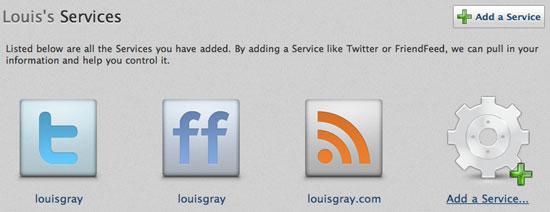
The more people and blogs you follow on social networks and through RSS, the more likely it is that you are going to see duplicate data, be it via retweets, forwards, or through many of your friends sending the latest viral videos or images. A new product under development, called Cadmus, looks to filter your real time streams to group similar posts in your feeds to reduce the noise. The service currently works on your Twitter account, your FriendFeed account, or on any number of blogs you add. You can also add many RSS feeds at once via OPML.


Adding Supported Services to Cadmus

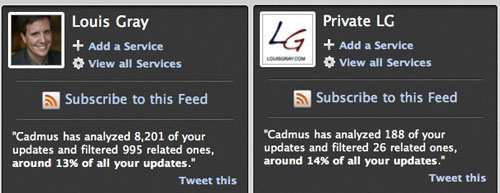
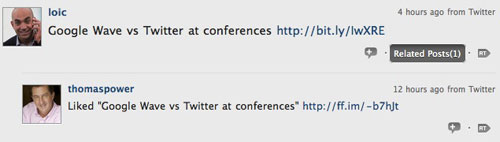
In my testing of Cadmus, I found it correctly detected retweets, replies from others to the original sender, copies of tweets sent to FriendFeed, and other topically-related items, even if they did not share keywords. Cadmus was even able to find similar updates that were hours or days apart.


The Results: A Quieter Feed By About 10 Percent

On average, each refresh of Cadmus filtered around 10 percent of my updates. For runs that included 3,000 or so updates, 300 individual items would be grouped or filtered - and testing of a smaller account in the low hundreds also showed a similar 10 percent filter rate. In fact, the more updates I filtered, the higher the percentage filtering would be found. In a run comprising more than 8,000 items, almost 1,000 were "related".


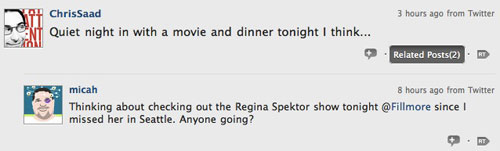
Cadmus Knew Both Micah and Chris Were Watching a Show


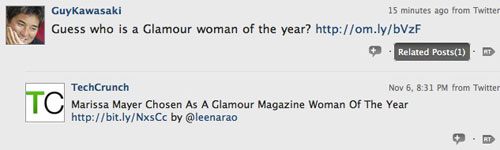
Cadmus Saw Guy Talking About an Article TechCrunch Mentioned


Cadmus Linked Thomas Power's Like of Loic's Share

The authors, Anomaly Innovations, who are chronicling Cadmus' development on their blog, show even higher filtering rates, of almost 30 percent, if you looked at an entire week's worth of updates. And while most of the filtered items only had one or two related posts, you can see an extreme version from the last week here.

To use Cadmus, you need to log in at http://thecadmus.com/, using OAuth, to your Twitter account, and you can add as many supported services as you like to the system. Once you have scanned your stream, click the reload button in the top right to get a newly filtered stream. If you're tired of seeing duplicates, want a stream with less noise, or just want to lump similar items, it is an interesting development - one I expect to get better as they continue to update.